
Before you configure a single app, you have to decide where your Odoo 19 Enterprise database will live. The hosting choice shapes what you can customise, who controls the server, how often you must upgrade and who is responsible for backups.
Odoo offers three hosting routes: Odoo Online, Odoo.sh and on-premise (self-hosted). All three run the same standard Enterprise apps, but they differ sharply as soon as you need custom code, server access or a particular upgrade rhythm.
A note on sources: this guide follows Odoo's official documentation for version 19.0. Hosting rules and policies can change, so confirm every point that matters to your project in a test database and against your own subscription terms before you commit.
The three options in one minute
- Odoo Online: Odoo's software-as-a-service. Odoo runs the servers and the platform, and you work inside the standard apps and Studio.
- Odoo.sh: Odoo's official cloud platform for hosting and managing Odoo with your own code, connected to a GitHub repository and organised into development, staging and production branches.
- On-premise: you install and run Odoo on your own server, or on a cloud server you rent, and register the database with your Enterprise subscription code.
Customisation: the deciding factor for most projects
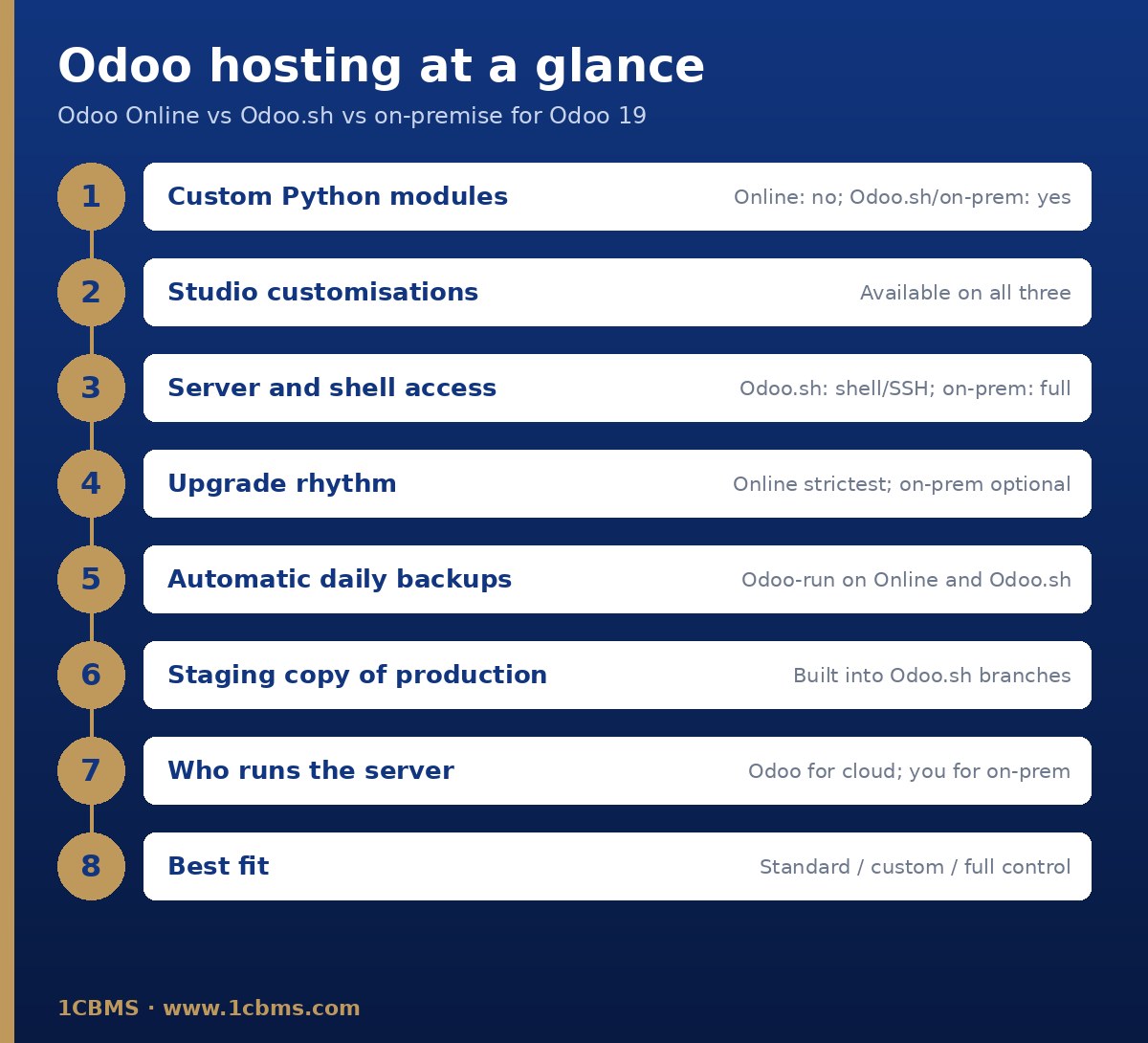
Odoo's documentation is explicit that Odoo Online is incompatible with custom modules and with modules from the Odoo Apps Store. On Online you configure the standard apps and can build customisations with Studio, but you cannot install your own Python modules.
Odoo.sh is built for custom code. You push your modules to a branch of your GitHub repository and the platform automatically detects folders that contain Odoo modules. Publicly available community modules can also be added, for example as Git submodules.
On-premise gives the same freedom as Odoo.sh for custom modules, because you control the server and the add-ons it loads. The difference is that nothing around the code is managed for you.
A practical rule: if your requirements include any custom Python development or any third-party app from the Apps Store, Odoo Online is ruled out and the real decision is between Odoo.sh and on-premise.
Control and access
On Odoo Online you manage the database through Odoo's database manager. From there you can duplicate it for testing, rename it, download a backup, start an upgrade when one is available, manage domain names and transfer ownership. There is no server or shell access.
On Odoo.sh each branch comes with developer tooling in the browser: a web shell for basic Linux commands and psql, an online editor with Python and Odoo shell consoles, SSH access with your own key, and a mail catcher that intercepts emails from non-production builds.
On-premise gives full control of the operating system, PostgreSQL, the reverse proxy and the Odoo configuration file. Odoo's deployment guide treats security as a continuous process and lists tasks such as serving Odoo over HTTPS behind a reverse proxy, setting a database filter on multi-database servers, using a PostgreSQL user that is not a superuser and disabling the database manager on internet-facing systems.
Upgrade obligations
Each hosting type comes with a different upgrade rule. It is often overlooked during selection and becomes urgent later, so put it on the table from day one.
- Odoo Online: according to Odoo's upgrade documentation, a database on a major version must be upgraded every two years, and a database on a minor version must be upgraded a few weeks after the next version is released. If no action is taken before the due date, Odoo upgrades the database automatically.
- Odoo.sh: after the initial three years of support for a version, you have another two years to complete the upgrade, and you are notified when an upgrade is required.
- On-premise: you can stay on the same version indefinitely. Odoo does not recommend it, and smaller version gaps make upgrades easier.
Custom modules affect every option except Online. Odoo states that a database with custom modules cannot be upgraded until those modules are available for the target version, and that making them compatible is the responsibility of the module's maintainer.
With Odoo Enterprise, the upgrade service covers standard apps, Studio customisations while Studio is still installed and the subscription is active, and developments covered by a maintenance of customisations subscription. In-house or third-party modules without such a contract, clean-up of existing data and training are not covered.
The recommended process is the same on every platform: request an upgraded test database, update any custom modules, test thoroughly, report issues to Odoo, and then plan the production upgrade, during which the database is unavailable.
Backups and test copies
Odoo Online: the documentation states that backups are taken daily under the Odoo Cloud Hosting SLA. You can also download a backup ZIP from the database manager; if the database is too large for that, Odoo Support provides another method.
Odoo.sh: the production database is backed up automatically every day, and each backup includes the database dump, the filestore, logs and sessions. The documentation lists seven daily, four weekly and three monthly backups, with dedicated backup servers holding additional monthly copies. You can also take manual backups of production and staging builds.
Staging and development builds on Odoo.sh are not backed up automatically. Staging databases are neutralised duplicates of production that are removed after a while, and development databases are short-lived and built from demo data, so never keep real work only there.
On-premise: backups are entirely your job. Schedule backups of both the PostgreSQL database and the filestore, keep copies away from the server, and test restores on a regular basis.
Whichever option you choose, upgrade test databases and Odoo.sh staging databases are neutralised: scheduled actions are disabled, outgoing mail is intercepted or replaced, and payment and shipping connectors are put in test mode. That protects production, but integrations must be re-enabled deliberately if you want to test them.
Cost drivers to compare without a price list
Prices depend on your contract and change over time, so compare what drives the cost rather than headline figures.
- Subscription scope: Odoo.sh requires an Enterprise subscription code that includes Odoo.sh hosting, while on-premise uses an Enterprise subscription registered on your own server, with one database linked per subscription.
- Users: an on-premise database must stay within the number of users in its subscription; exceeding it triggers a warning and a limited period to correct the count before the database expires.
- Infrastructure: on Odoo.sh you size workers, storage and staging builds within the platform; on-premise you pay for servers, storage, bandwidth and monitoring yourself, and the server must keep network access to Odoo's validation service.
- People: on-premise needs someone who can administer Linux, PostgreSQL, HTTPS and security updates; Odoo.sh needs developers comfortable with Git; Odoo Online needs neither.
- Customisation lifecycle: every custom module must be maintained and ported at each upgrade, which is a recurring cost on Odoo.sh and on-premise unless it is covered by a maintenance subscription.
Who each option suits
Odoo Online suits companies that can work with standard Odoo plus Studio, want the fastest start and are comfortable with Odoo's upgrade schedule. Trading, services and retail businesses with standard processes are typical candidates.
Odoo.sh suits projects that need custom modules or third-party apps but do not want to run servers, and that value testing every change on a staging copy of production before it goes live.
On-premise suits organisations with an in-house IT team, strict data location or network requirements, integrations with local hardware, or a need to decide exactly when upgrades happen.
If you are considering Odoo Community, note that Odoo.sh requires an Enterprise subscription code and the free upgrade service described above is an Enterprise benefit, so Community is normally self-hosted and upgraded at your own effort.
Enterprise is not a separate code base: Odoo's installation documentation describes the Enterprise repository as a collection of extra add-ons on top of Community, so a self-hosted Enterprise installation needs both. Moving from Community to Enterprise later is a project of its own, as Odoo's upgrade documentation does not treat switching editions as part of an upgrade.
Moving between hosting types later
The choice is not permanent, but moving is easier in some directions than others.
- From Odoo Online to Odoo.sh or on-premise: download a backup from the database manager and import or restore it. Intermediary Online versions are not supported elsewhere, so you may need to upgrade to the next major version first.
- From Odoo.sh or on-premise to Odoo Online: all non-standard apps must first be uninstalled, in a staging build or a duplicate database, and the migration itself is requested through an Odoo support ticket.
- From on-premise to Odoo.sh: use the import on the production branch's Backups tab. The import needs free storage of four times the dump size, overwrites the branch's current data, and disables outgoing mail servers and scheduled actions until you re-enable the ones you need.
A decision checklist
- Do we need any custom Python module or Apps Store module, now or in the foreseeable future? If yes, exclude Odoo Online.
- Can we accept Odoo Online's mandatory upgrade schedule, or do we need more control over when each version change happens?
- Do we need a staging copy of production to test every change before go-live?
- Do we have, or can we hire, people to run Linux, PostgreSQL, HTTPS, monitoring and security for an on-premise server?
- Are there data location, network or hardware constraints that require our own server?
- Who owns backup verification and restore testing, and how often will it be done?
- Who maintains and ports our custom modules at each upgrade, and is that covered by a maintenance subscription?
How 1CBMS can help
1CBMS helps companies in Egypt and Iraq choose the right Odoo hosting before implementation starts. We map your requirements against what each platform allows, flag any need for custom modules early, set up Odoo.sh projects or on-premise servers with sound backup and security practices, and plan upgrades so your Odoo 19 Enterprise system stays supported. Contact us through www.1cbms.com to review your case.