
Very few companies run on a single system. Even when Odoo is the core ERP, it usually has to talk to a payment gateway, a shipping carrier, a bank, an online store, an attendance device or a legacy application. The quality of those links decides whether your data is trustworthy or whether your team spends every month reconciling differences by hand.
Odoo 19 Enterprise offers a layered toolbox: built-in connectors configured from the apps, an external API for developers, automation rules that can receive and send webhooks, and file imports for cases where a live connection is not possible. Middleware tools sit on top of these when you need orchestration between many systems.
A note on sources: this article follows Odoo's official documentation for version 19.0 (the odoo/documentation repository). Menus, options and plan conditions can change between versions and hosting types, so always confirm each step in a test or duplicate database before applying it in production.
Choose the right integration pattern
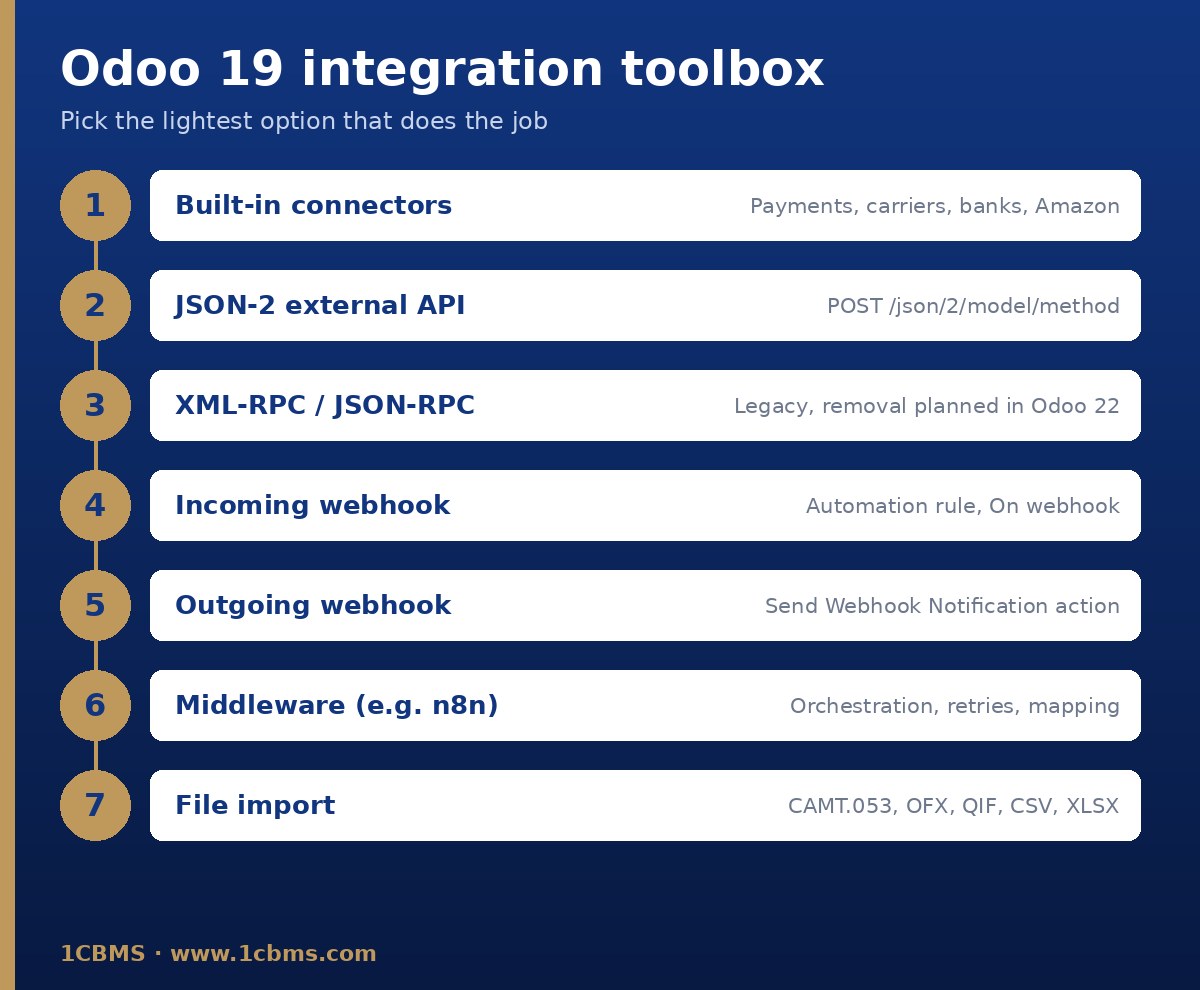
Start from the business need, not from the technology. Ask what data must move, in which direction, how quickly, and who owns the master record. Then choose the lightest option that meets the need.
- Use a built-in connector when Odoo already supports the provider, such as a listed payment provider, shipping carrier, bank synchronization provider or the Amazon connector.
- Use the external API when another application needs to read or write Odoo records on its own schedule.
- Use an incoming webhook when an external system should push an event into Odoo the moment it happens.
- Use an outgoing webhook when Odoo should notify another system after a change, for example when a record is created or a field is updated.
- Use middleware when several systems are involved, when data needs heavy transformation, or when you need central retries and monitoring.
- Use file import when the other party only provides files, such as bank statements in CAMT.053, OFX, QIF, CSV or XLSX format.
The external API in Odoo 19: JSON-2 and API keys
Odoo 19 introduces the JSON-2 API, which exposes part of the ORM over HTTP. Each call is a POST request to an endpoint of the form /json/2/ followed by the model name and the method name, for example the search_read method of the res.partner model. The request body carries the method arguments as JSON.
Authentication uses an API key sent in the Authorization header as a bearer token. There is no separate login step with a user ID and password, so the key identifies the user and the integration acts with that user's access rights.
To create a key manually, open your user Preferences, go to Account Security and choose New API Key. A description and a duration are required, and the key value is shown only once, so store it immediately in a secure secrets vault. The documentation states that keys cannot be created for more than three months, so plan a key rotation routine from the start.
When one server hosts several databases, the optional X-Odoo-Database header tells Odoo which database the call targets. Behind a reverse proxy, make sure the Host header reaches Odoo correctly.
Each JSON-2 call runs in its own database transaction: it is committed on success and rolled back on error. You cannot chain several calls into one transaction, so prefer a single method that does the related work, such as a search_read or a business method, instead of many small calls that can leave data half-updated.
Errors are returned with a 4xx or 5xx HTTP status and a JSON body that includes a name and a message. Your client code should read both and log them.
Legacy XML-RPC and JSON-RPC: plan your migration
Many existing integrations use the older XML-RPC endpoints or the JSON-RPC endpoint. In Odoo 19 these are deprecated, and the official documentation says they are scheduled for removal in Odoo 22. They still work today, but new projects should be built on JSON-2, and existing ones should be listed and migrated as part of your upgrade roadmap.
- Inventory every script, connector and third-party tool that calls the old endpoints.
- Replace login and password authentication with dedicated API keys per integration.
- Rewrite multi-step sequences into single calls where possible, because of the one-transaction-per-call behaviour.
- Test the migrated version against a duplicate database before switching production traffic.
Plan availability also matters. The documentation states that access to data via the external API is only available on Custom Odoo pricing plans, not on One App Free or Standard. Check your subscription before you design an API-based integration on Odoo Online.
Webhooks and automation rules
Automation rules let Odoo react to events without custom modules. In Odoo 19 Enterprise you manage them from Studio through the Automations menu, and incoming webhooks also have their own Webhooks entry in Studio. Developer mode gives more control, including the choice of target model.
For an incoming webhook, create a rule with the On webhook trigger. Odoo generates the URL automatically; the external system sends a POST request with a JSON payload to that URL. The target record code tells Odoo which record the payload refers to, and the Actions To Do tab defines what happens next, typically an Execute Code action when you need to create records rather than update one.
Enable Log Calls while you build and troubleshoot. It records the history of requests to the URL, which you can open from the Logs smart button on the rule.
Treat the webhook URL as a secret. The documentation warns that sharing it can provide unintended access to the database. If it is exposed, use Rotate Secret to generate a new URL and update the external system.
For outgoing notifications, add the Send Webhook Notification action to a rule. It sends a POST request with the values of the fields you select to the URL you specify, and a sample payload helps you check the structure before going live.
When writing Execute Code actions, use the log function to write messages to the database log table, so failures are visible to functional users and not only in server logs.
Studio is part of Odoo Enterprise. In Community, there is no Studio interface, so the same needs are usually covered by developer-mode configuration or by small custom modules maintained by a developer.
Built-in connectors for common integrations
Before writing code, check whether Odoo already covers the provider. Built-in connectors are maintained with each release and are usually the safest choice.
- Payment gateways: configure them from Configuration, then Payment Providers, in the Accounting, Website or Sales app. Listed providers include Stripe, Adyen, PayPal, Paymob, Mollie, Razorpay and others. Enter credentials in the Credentials tab and use Test mode with sandbox credentials first, ideally on a duplicate database to protect invoice numbering. The payment journal must be a Bank journal.
- Shipping carriers: enable them from Inventory settings in the Shipping Connectors section. Supported connectors include DHL Express, FedEx, UPS, Sendcloud, EasyPost and others. Each shipping method starts in a test environment; switching to production creates real labels that the carrier may bill, so verify rates and labels first. The Debug Requests option logs the exchanged messages.
- Banks: bank synchronization imports transactions through third-party providers such as Plaid, Yodlee, Salt Edge, Ponto, Enable Banking and Basiq, and requires a valid Enterprise subscription. Where your bank is not covered, import statement files from the Bank journal on the Accounting dashboard.
- E-commerce and marketplaces: Odoo's own eCommerce app shares the same database, so no connector is needed. For Amazon, the Amazon Connector synchronizes orders into sales orders and matches products by internal reference.
- Attendance devices: the Attendances app supports kiosk mode on a dedicated device and check-in from the backend. Biometric terminals from other vendors are not covered by the official documentation, so they are usually connected through a custom module or middleware that pushes check-ins into Odoo.
Middleware such as n8n
Middleware platforms such as n8n sit between Odoo and other systems. They are third-party tools, not part of Odoo, and they talk to Odoo through the same external API and webhooks described above.
They are useful when one event must update several systems, when field mapping is complex, or when you want a visual flow with central error handling and retries. The trade-off is one more component to host, secure, monitor and upgrade, and the same plan conditions for API access still apply.
Design rules: idempotency, error handling and logging
Most integration problems come from repeated messages, partial failures and silent errors. Design for them from day one.
- Make every write idempotent: store the external reference on the Odoo record and check it before creating, so a resent webhook or a retried call does not create a duplicate order or payment.
- Decide who owns each field, and never let two systems overwrite the same value.
- Keep one business operation in one call where possible, because each JSON-2 call is its own transaction.
- Retry only on temporary failures, with increasing delays, and send permanent failures to a review queue.
- Log the request, the response and the Odoo record reference for every exchange, using Log Calls, Debug Requests or your middleware's history.
- Monitor volumes and failures daily during the first weeks, and reconcile totals such as payments, shipments and bank balances between systems.
Security checklist
- Create a dedicated integration user with only the access rights the integration needs, and generate its API key from that user.
- Use one key per integration, record its purpose in the description, choose a short duration and rotate it before it expires.
- Store keys and webhook URLs in a secrets manager, never in spreadsheets, chat messages or source code.
- Revoke keys and rotate webhook secrets immediately when a vendor relationship ends or a leak is suspected.
- Always use HTTPS, and build and test every integration on a duplicate database before enabling it in production.
How 1CBMS can help
1CBMS designs and implements Odoo 19 integrations for companies in Egypt and Iraq, from configuring payment providers, carriers and bank feeds to building JSON-2 API and webhook integrations, migrating legacy XML-RPC scripts, and connecting attendance devices and in-house systems through custom modules or middleware. We start with a mapping of data ownership and flows, test everything in a duplicate database, and hand over clear documentation and monitoring so your team can trust the numbers. Contact us at www.1cbms.com to review your integration landscape.